
EXAMPLE 1
Middle C
C4 · A4 = 440 Hz
261.63 Hz
Nine semitones below A4, middle C is a common reference for tuning oscillators and resonant filters.
Find the frequency of any equal-tempered note, compare octaves and recalculate the entire tuning table from a custom A4 reference.
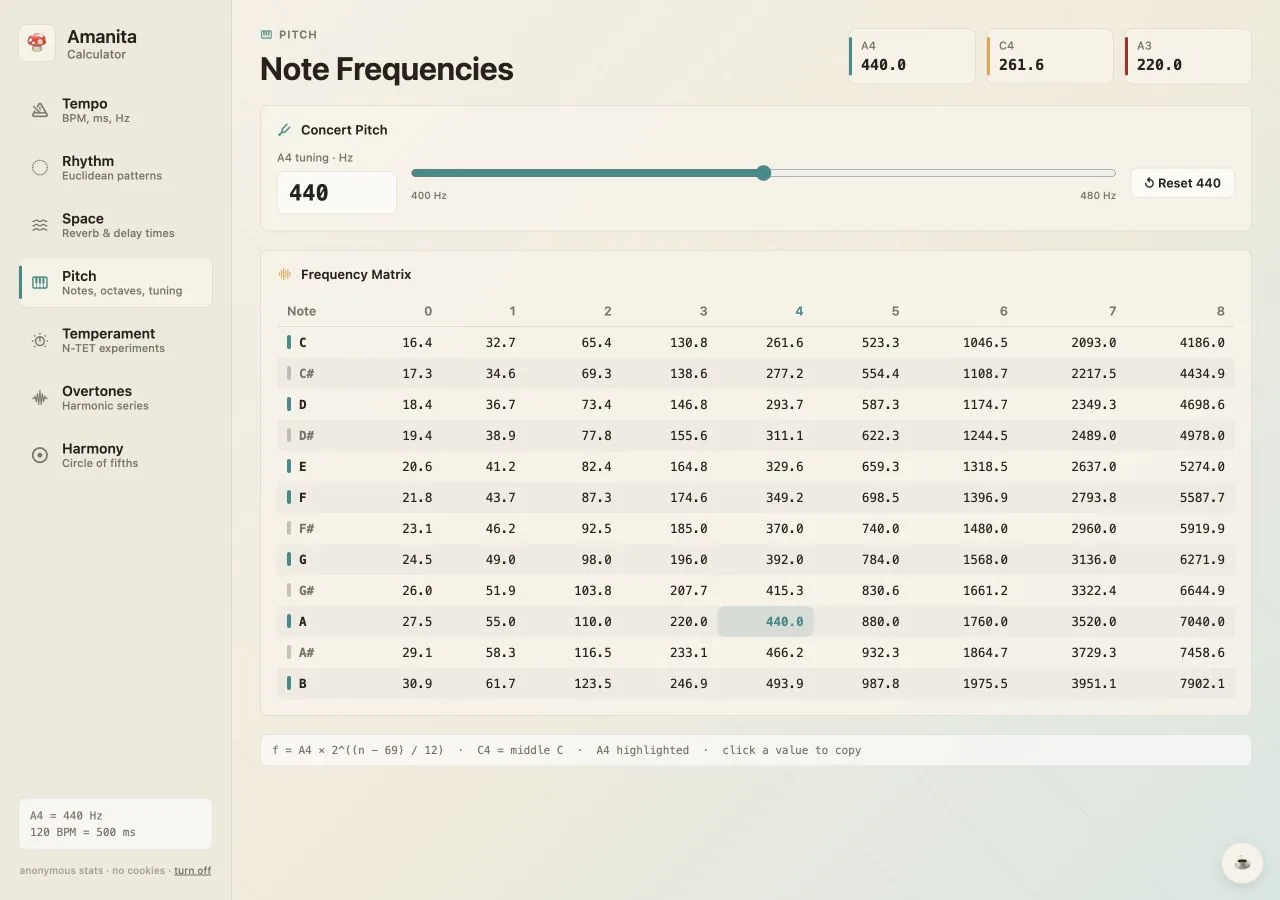
MIDI note 69 is A4. Middle C is MIDI note 60, which gives 261.63 Hz when A4 is 440 Hz.
In 12-tone equal temperament, every semitone multiplies frequency by the twelfth root of two. Moving up twelve semitones doubles the frequency; moving down twelve halves it.
The usual reference is A4 = 440 Hz, but orchestras, historical practice and sound-design workflows may use another value. Amanita recalculates every note immediately when the reference changes.
Concrete values you can verify in the calculator and transfer directly to a production session.
Nine semitones below A4, middle C is a common reference for tuning oscillators and resonant filters.
Useful when matching a sub, resonator or filter peak to the key of F-sharp.
Changing the reference shifts the entire table while preserving equal-tempered intervals.
| Note | Semitones from A4 | A4 = 440 Hz | A4 = 432 Hz |
|---|---|---|---|
| F#3 | -15 | 185.00 Hz | 181.63 Hz |
| A3 | -12 | 220.00 Hz | 216.00 Hz |
| C4 | -9 | 261.63 Hz | 256.87 Hz |
| C5 | +3 | 523.25 Hz | 513.74 Hz |
| D#5 | +6 | 622.25 Hz | 610.94 Hz |
The calculator is deliberately direct: set the musical context, inspect the result and copy it where you need it.
Tune oscillators, comb filters and resonators to exact pitches.
Locate the fundamental or harmonic region of a note in an EQ or spectrum analyzer.
Compare measured pitch with the expected equal-tempered frequency.
Rebuild the frequency table around a concert pitch other than A4 = 440 Hz.
Studio note: A note name alone is not enough: always include the octave. C3, C4 and C5 share a pitch class, but each octave doubles the frequency.
Open the exact tool with your saved tempo and tuning values intact. Nothing to install, no account and no ads.