EXAMPLE 1
C major
No sharps or flats
C · Dm · Em · F · G · Am · B°
Its relative minor is A minor, dominant is G major and subdominant is F major.
Move through major and minor keys, inspect signatures and diatonic chords, then build and audition progressions at the tempo shared across Amanita.
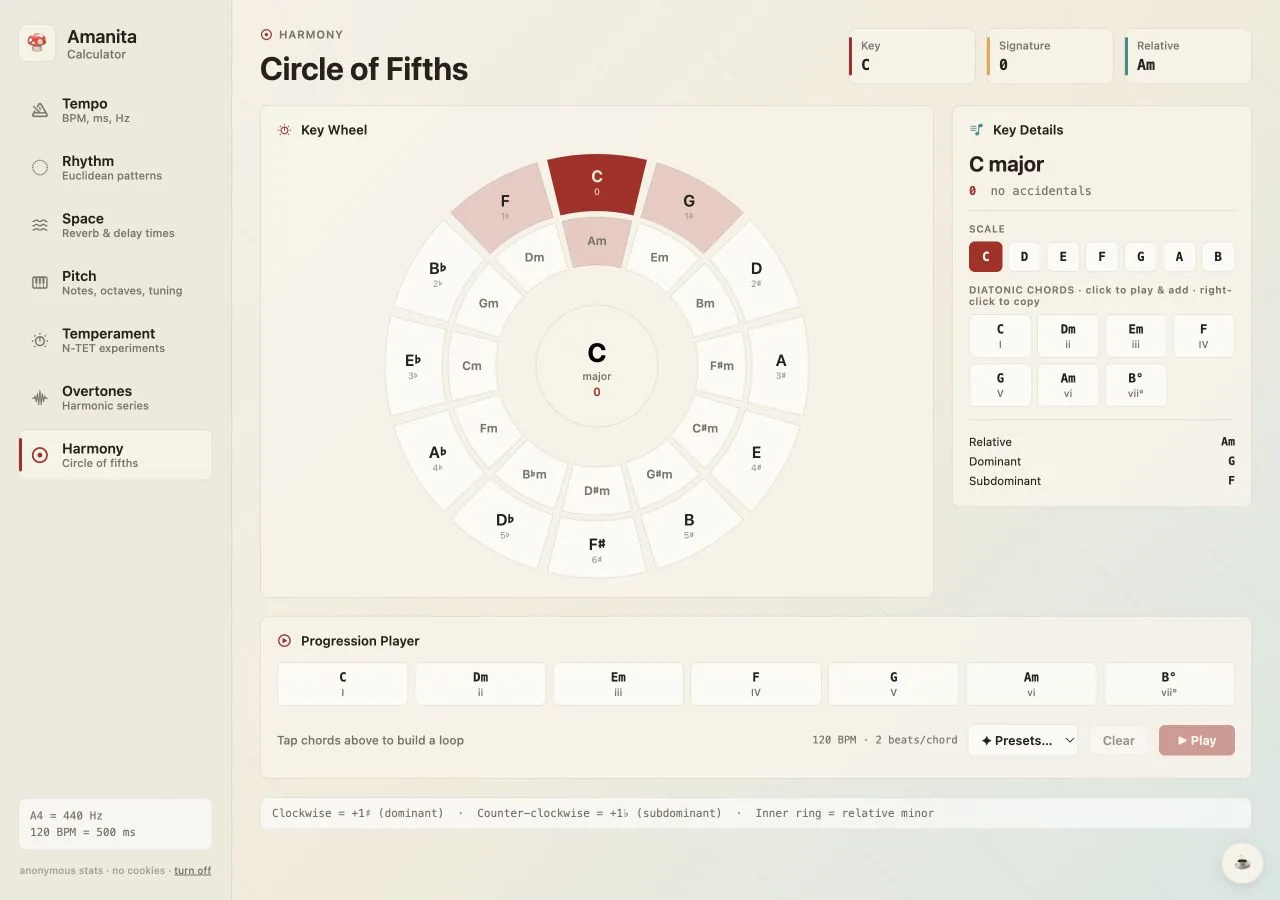
Clockwise movement also increases the number of sharps by one; counter-clockwise movement increases the number of flats by one.
The circle of fifths arranges pitch classes by perfect fifth. Moving clockwise adds one sharp to the key signature; moving counter-clockwise adds one flat. Keys next to each other share six of seven scale notes, so they often connect smoothly.
The inner ring shows relative minor keys, which use the same signature as their major relatives. Amanita also lays out the seven diatonic chords and lets you assemble a progression before trying it in the DAW.
Concrete values you can verify in the calculator and transfer directly to a production session.
Its relative minor is A minor, dominant is G major and subdominant is F major.
The relative minor is C minor; adjacent circle keys are B-flat and A-flat major.
The same functional pattern can be moved to any selected major key without changing its harmonic role.
| Major key | Signature | Relative minor | Dominant | Subdominant |
|---|---|---|---|---|
| C | 0 | Am | G | F |
| G | 1 sharp | Em | D | C |
| E♭ | 3 flats | Cm | B♭ | A♭ |
| A | 3 sharps | F#m | E | D |
| F | 1 flat | Dm | C | B♭ |
| F# | 6 sharps | D#m | C# | B |
The calculator is deliberately direct: set the musical context, inspect the result and copy it where you need it.
Find diatonic chords and reliable progression starting points in any key.
Move through neighboring keys with maximum shared notes and minimal friction.
Identify compatible keys when layering loops, vocals and melodic samples.
Use relative major and minor relationships to change mood without changing the signature.
Studio note: The circle is a map, not a rule. Nearby keys give smooth movement, while distant keys can create the contrast that makes a section feel new.
Open the exact tool with your saved tempo and tuning values intact. Nothing to install, no account and no ads.